

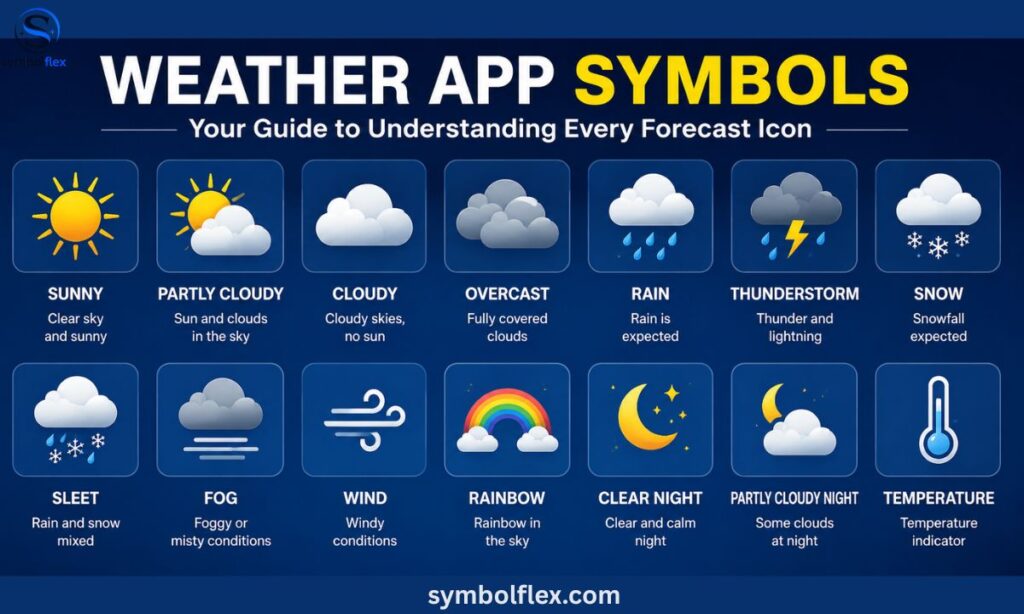
You glance at your phone before stepping out, spot a tiny icon next to the temperature, and make a split-second call: jacket or no jacket, umbrella or sunglasses. Most of the time it’s easy — but every app has a few symbols that leave people guessing, like a cloud with three dots, a half-hidden hazy sun, or a triangle with an exclamation mark.This guide breaks it all down in one place.
You’ll get the exact meaning of 40+ weather app icons, learn how to tell similar-looking symbols apart (like fog vs. haze, or rain vs. drizzle), understand what the rain percentage number actually means, see how the iPhone Weather app styles its icons, and know instantly which symbols are just informational — and which ones (like tornado or severe alert icons) mean you should actually pay attention.
How Weather App Symbols Work

Weather symbols are a shorthand. Instead of writing out “partly cloudy with a chance of afternoon showers,” an app shows you a small icon that communicates the same idea in under a second. Most weather icon sets are built from a handful of core visual elements combined in different ways:
- Sun or moon – clear sky, adjusted for day or night
- Cloud shapes – amount and type of cloud cover
- Lines or dots – rain, drizzle, or intensity of precipitation
- Bolt – lightning and thunderstorm activity
- Snowflake or crystals – snow and wintry mix
- Wavy lines – fog, haze, or reduced visibility
- Arrows or streaks – wind direction and speed
- Triangles or exclamation marks – warnings and severe weather alerts
Once you recognize these building blocks, even unfamiliar icon sets become easy to interpret, because most weather apps — including Apple’s, Google’s, AccuWeather’s, and The Weather Channel’s — reuse the same visual grammar with only minor style differences.
Clear Sky and Sun Symbols
1. Sunny / Clear Sky (Day)
A plain, bright yellow or orange sun. This means clear skies with no significant cloud cover during daylight hours.
2. Clear Sky (Night)
A crescent moon, sometimes with a star or two beside it. Same meaning as “sunny,” just after sunset — an important distinction, since a plain sun icon at night would be misleading.
3. Mostly Sunny
A sun with a very thin, small cloud at the edge. Expect abundant sunshine with only minor cloud cover, generally under 25%.
4. Strong Sun / UV Warning
Some apps show a sun with radiating lines or an added UV badge. This signals high UV index and intense sunshine, a cue to consider sunscreen or shade during peak hours.
Cloud-Related Symbols
5. Partly Cloudy (Day)
A sun partially covered by a cloud. Cloud cover sits roughly between 25–50%, with sunny spells throughout the day.
6. Partly Cloudy (Night)
A moon partially covered by a cloud — the nighttime equivalent of the icon above.
7. Mostly Cloudy
A larger cloud dominating the icon, with only a sliver of sun or moon peeking through. Cloud cover is heavy, usually 50–85%.
8. Cloudy / Overcast
A single, solid gray or white cloud with no sun or moon visible. Skies are fully or almost fully covered.
9. Cloudy with Sunny Breaks
Sometimes shown as two clouds with a small sun between them. This indicates variable cloud cover — expect the sky to shift between overcast and clear throughout the day.
Rain and Precipitation Symbols

10. Light Rain / Drizzle
A cloud with a few thin, light lines or small dots beneath it. Indicates light, often intermittent rainfall.
11. Rain
A cloud with several solid diagonal lines. This is standard rainfall — moderate intensity, more sustained than drizzle.
12. Heavy Rain
A darker cloud with dense, thick diagonal lines, sometimes shown with more lines packed closer together. Signals a higher risk of downpours and localized flooding.
13. Scattered Showers
A sun (or moon) alongside a cloud with light rain lines. This means rain isn’t constant — it comes and goes, mixed with clearer spells.
14. Chance of Rain (Percentage Icon)
Not always a distinct symbol, but many apps pair the rain icon with a percentage figure. This number represents the probability of measurable precipitation at that location and time, not how much rain will fall.
15. Freezing Rain
A cloud with icy-looking, jagged or dotted lines instead of smooth ones. This is a serious driving hazard, since rain freezes on contact with cold surfaces.
16. Sleet / Wintry Mix
A cloud combining raindrop lines and small ice pellets or snowflake shapes. Indicates a mix of rain, freezing rain, and small ice pellets — common during transitional seasons.
Thunderstorm Symbols
17. Thunderstorm
A cloud with a lightning bolt cutting through it, often paired with a rain line or two. Signals thunder and lightning, usually with rain.
18. Severe Thunderstorm
A darker cloud, a bold lightning bolt, and sometimes an added warning triangle. Points to storms capable of high winds, large hail, or heavy rain — worth checking local alerts.
19. Isolated Thunderstorms
A sun or partly cloudy icon with a small lightning bolt tucked beside it. Storms are possible but only in scattered spots, not widespread.
20. Lightning Only (No Rain Shown)
Occasionally shown as a cloud with just a bolt and no rain lines. This usually represents dry thunderstorms — lightning activity without significant rainfall, more common in arid regions.
Snow and Winter Weather Symbols

21. Light Snow
A cloud with one or two small snowflakes. Indicates light snowfall, typically with minimal accumulation.
22. Snow
A cloud with several snowflakes of moderate size. Standard snowfall — enough to accumulate and affect travel.
23. Heavy Snow
A darker cloud with many snowflakes, sometimes layered or larger in size. Warns of significant accumulation and potentially hazardous conditions.
24. Flurries
A sun or partly cloudy background with one small snowflake. Light, scattered snow, often not accumulating.
25. Blizzard
A cloud with dense snowflakes plus wind streaks or lines. Combines heavy snow with strong wind, and often very low visibility — one of the more serious winter symbols.
26. Snow Showers
Similar to scattered rain showers, but with snowflakes instead of rain lines, sometimes mixed with a sun icon. Snow that comes in bursts, not continuously.
27. Hail
A cloud with small circles or ice pellet shapes falling. Represents ice pellets, often shown during severe thunderstorm forecasts.
Fog, Haze, and Visibility Symbols
28. Fog
Horizontal wavy lines, sometimes layered with a faint sun or cloud in the background. Represents reduced visibility due to low-lying moisture in the air.
29. Haze
Similar wavy lines but often drawn thinner or dustier-looking, sometimes tinted yellow or gray. Indicates reduced visibility from dust, smoke, or pollution rather than moisture.
30. Mist
Lighter, finer wavy lines than fog. Represents very light moisture in the air — visibility is reduced but less severely than in fog.
31. Smoke
Wavy lines with a grayish or brownish tint, sometimes drawn to look like drifting smoke. Points to visibility reduced by wildfire smoke or similar sources.
Wind Symbols
32. Windy
A cloud or sun with curved arrow lines or streaks beside it. Signals notably strong sustained wind, not just a light breeze.
33. Wind Gusts
Similar wind lines but drawn more jagged or with a burst pattern. Highlights short bursts of high wind speed rather than steady wind.
34. Wind Direction Arrow
A simple arrow, often shown in the hourly or detailed forecast view, rotated to reflect the direction the wind is blowing from.
Temperature and Special Condition Symbols
35. Extreme Heat
A sun icon shown in red or orange with radiating heat lines, sometimes with a thermometer. Signals dangerously high temperatures, often tied to a heat advisory.
36. Extreme Cold
A blue-tinted icon, sometimes with a snowflake and thermometer, or a wind-chill symbol. Warns of dangerously low temperatures or wind chill.
37. Frost / Freeze Warning
A cloud or clear-sky icon overlaid with small ice crystal patterns. Indicates temperatures expected to drop to or below freezing, a concern for plants and pipes.
38. Dust Storm / Sandstorm
Swirling wavy lines, often tinted tan or orange. Represents blowing dust or sand severely reducing visibility, common in arid regions.
39. Tornado
A funnel-shaped icon, sometimes emerging from a dark cloud. Reserved for active tornado warnings or watches — one of the most urgent symbols in any weather app.
40. Hurricane / Tropical Storm
A spiral icon resembling a storm system viewed from above. Used specifically for tropical cyclone tracking and forecasts.
41. Weather Alert / Warning Triangle
A triangle with an exclamation point, often shown as a banner rather than blended into the forecast icon. This doesn’t describe the weather itself — it flags that an official alert (watch, warning, or advisory) has been issued for your area, and tapping it usually opens the full alert text.
Weather Symbols on the iPhone Weather App

Apple’s Weather app uses its own polished icon set, but the underlying logic matches everything above. A few iPhone-specific things worth knowing:
- Color coding matters. On iPhone, sun icons appear in warm yellow/orange tones, rain and cloud icons in blue-gray, and snow icons in cooler blue-white tones, making it easy to scan conditions at a glance.
- Icons shift for day and night automatically, based on your device’s local sunrise and sunset times, not a fixed clock.
- Tapping any icon in the hourly or 10-day forecast opens more detail, including precipitation chance, high/low temperatures, and any active weather alerts.
- The “Weather” complication on the Apple Watch uses simplified versions of the same icons, so recognizing them on iPhone also helps on the watch face.
Quick Reference Table
| Symbol Type | What It Shows | What To Expect |
| Plain sun/moon | Clear sky | No rain, minimal cloud |
| Sun + small cloud | Mostly clear | Slight cloud cover |
| Sun/moon half-covered | Partly cloudy | Mixed sun and cloud |
| Solid gray cloud | Overcast | Full cloud cover, no rain |
| Cloud + light lines | Light rain/drizzle | Minor, possibly intermittent rain |
| Cloud + heavy lines | Heavy rain | Downpours possible |
| Cloud + bolt | Thunderstorm | Thunder and lightning |
| Cloud + snowflakes | Snow | Accumulating snowfall |
| Cloud + wind lines + snow | Blizzard | Heavy snow, strong wind, low visibility |
| Wavy horizontal lines | Fog/haze/mist | Reduced visibility |
| Curved arrow lines | Windy | Strong sustained wind |
| Funnel shape | Tornado | Active tornado watch/warning |
| Spiral | Hurricane/tropical storm | Tropical cyclone tracking |
| Triangle with “!” | Weather alert | Official watch, warning, or advisory issued |
Frequently Asked Questions
Why do weather symbols look different on every app?
Each provider designs its own icon style, but they’re all built from the same basic elements (sun, cloud, rain lines, snowflakes).
What does the percentage next to the rain icon mean?
It’s the probability of rain occurring, not how much rain will fall or how much of the area will get wet.
What’s the difference between a watch and a warning icon?
A watch means severe weather is possible, while a warning means it’s happening or imminent.
Why is my app showing a moon icon during the day?
Check your device’s date, time, and location settings, since icons follow your local sunrise/sunset schedule.
Do weather symbols show temperature?
No, symbols only show sky/precipitation conditions — temperature is always displayed separately as a number.
Final Takeaway
Weather app icons look simple, but each one is doing real work — condensing sky conditions, precipitation type, intensity, and sometimes safety information into a shape you can read in an instant.
Once you know the visual patterns (sun for clear, cloud shape for cover, lines for rain, flakes for snow, bolts for storms, and triangles for alerts), you can glance at almost any forecast app, on any device, and understand exactly what to expect before you even step outside.
